Game Setup
Draw your starting hand
Each player draws from the decks. Draw 2 action cards + 1 project card + 1 workforce card.
Distribute tokens
Each player gets 3 coins. Hand out Prestige trackers.
Determine the first player
The best architect among the players goes first. It's up to you to agree. Tip: The best method for choosing the greatest architect is a quality argument…
Turn Flow
Complete a project or advance the work status indicator by one space — e.g. from turn 1 to turn 2. Apply effects of permanent red cards.
Well, if you can... You can only advance a project to the next phase if you have enough workforce available. If you can, flip the work marker from STOP to GO or advance it to the next space.
Draw!
At the start of each of your turns, draw 2 cards. 2 action cards, 1 action + 1 project, or 2 projects. Any combination of 2 cards!
Play cards from your hand
You can deploy as many cards as you like — a project, an action card, or a workforce card. You can only run projects once you've drawn an architect, who becomes the lead architect. If you don't manage it in your first turn, keep playing — maybe you'll get lucky. The same applies if someone destroys your lead architect and you have no replacement.
Pay your workforce
Pay your workforce, or dismiss them. If you can't pay, they leave. If you can't afford to pay an architect, add them the same number of burnout points as you would have paid in coins. Money and burnout points can be combined. If you want to voluntarily dismiss a workforce, you must pay severance equal to one salary (in the real world you don't have to, because most architects work on švarc contracts).
End of turn
You must have at most 4 cards in your hand.
How does it all end?
The game ends when the first player reaches 15 points. (Could be less — you're architects, do things your own way.) That player wins. There's no second or third place! Either you win or you're last — that's just how it is! The remaining players can then blame each other for not winning.
End of Game
Winner
The first player to reach 15 prestige points wins.
(Could be less. You're architects — do things differently.)
Only one place
There is no second or third place. Either you win or you're last — that's just how it is.
The loser's delight
The remaining players can then blame each other for not winning.
3 types of cards
3 types of cards
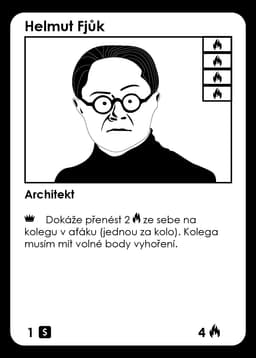
Workforce Cards
Cards representing your workers who execute projects and bring your studio to success
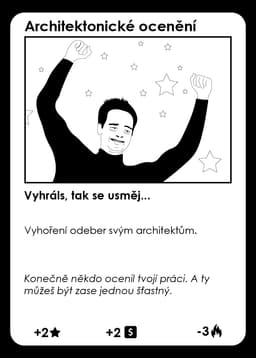

Action Cards
Special cards to perform unique actions, sabotage opponents, or strengthen your position
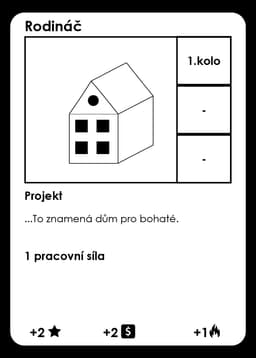
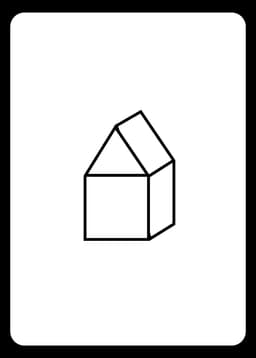
Project Cards
Project cards you must complete to earn prestige points and win the game
Game example
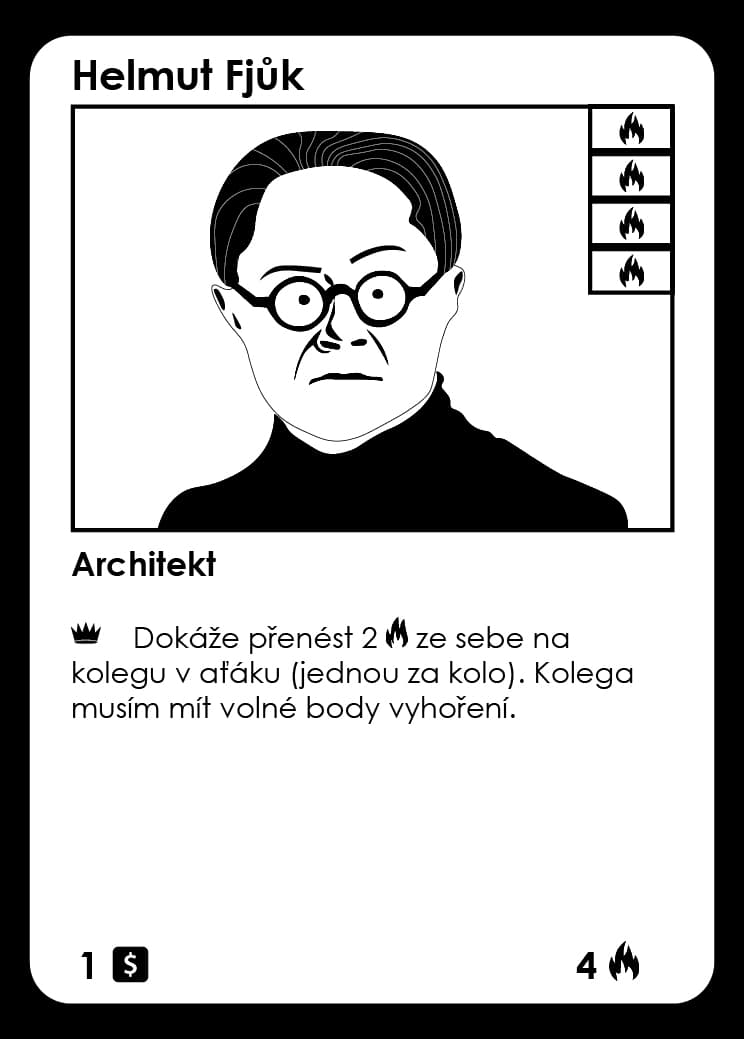
Workforce
Works on projects. An architect can lead a studio and gain special skills.
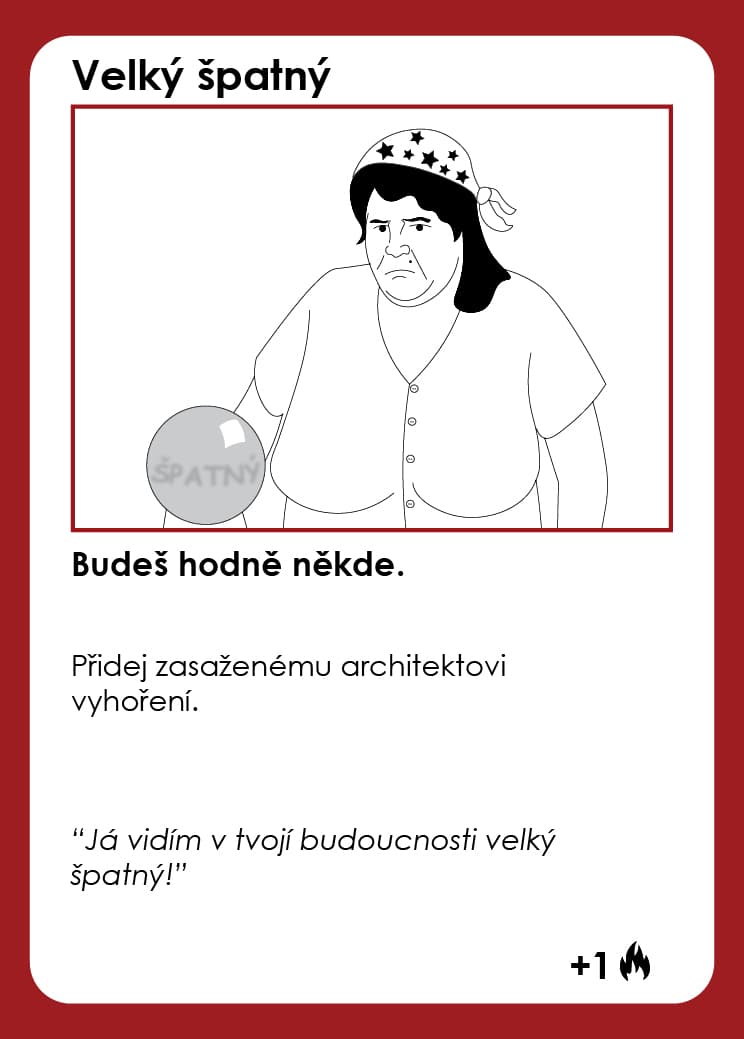
Action Card
A support card — heals burnout, adds money, cancels effects. For the 2nd spot I'd prefer an attack card with a red border.
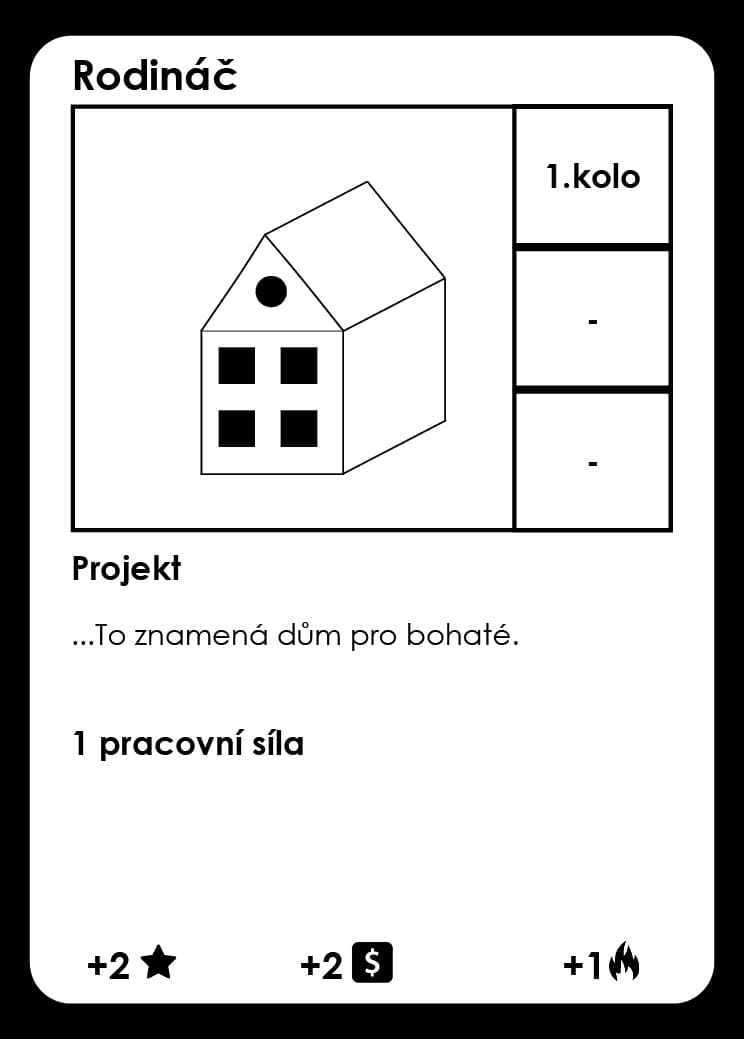
Project Card
They bring you money and burnout (that's just how it is.
Card Symbols

Prestige
When any player reaches 15 prestige points, the game ends.

Money
Currency, cash, dough, bucks, moolah, cheddar, bread, paper, green, loot, stacks, coin, guap. You use money to pay workforce or buy crunch.

Burnout points
If an architect reaches their maximum burnout, they're gone.

Lead architect
Marks the big boss. An architect can only use special abilities marked with a crown when they are the lead architect of the studio. Special abilities marked with a square can also be used by regular architects. A regular architect cannot use boss abilities and the lead architect cannot use regular architect abilities.

Work status indicator
Shows whether a project is currently running and what phase it's in.
Prestige tracker
Shows how much prestige each player has.
How Projects Work
Deployment condition
You can only play a project if you have enough workforce available (e.g. not working on another project). Tap assigned workforce near the played project.
Project leadership
Only architects and builders can lead projects. Apprentices and interns can only work as supporting workforce.
If the lead architect or builder leaves the project, the project cannot advance to the next phase — the project stalls. You can only replace or add workforce on your own turn.
GO indicator & STOP
When played, place the GO indicator on space 1. Each subsequent turn advance the indicator one space. You can only advance if you have enough workforce on the project. If workforce is missing, the project stalls.
If there is not enough workforce on the project, or the lead architect or builder is missing, flip the GO indicator to STOP!. If you see the STOP indicator at the start of your turn, you can only flip it back to GO — no advancement happens.
Project completion
You can only complete the project after moving the indicator past the last space. Upon completion, take the marked number of coins. Distribute burnout points among the workforce (at your discretion). If a workforce card cannot receive a burnout point, the point is lost.
Workforce with full burnout points are discarded. Prestige points and money go into your studio — and that's great!
Workforce elimination
If someone outside your turn eliminates a workforce or action card you needed to complete a project — the project stops. You can add workforce on your next turn, reactivating the project.
Moving workforce
If needed, you can move workforce from one running project to another, which pauses the first project (flip the indicator to STOP). You can flip the GO indicator back according to the rules above.
Architects & Burnout
Lead architect burns out
If the lead architect burns out, they are first replaced by another deployed architect in the studio. You can't run projects until you find a new lead architect. You keep playing normally until you draw an architect from the workforce deck or poach one from someone.
After every transfer of the lead architect crown, the studio loses 1 prestige point. You can move the crown voluntarily at any time on your turn — you'll still lose 1 prestige point.
Regular architect burns out
You don't care. There's a queue of replacements. They go to the discard pile — maybe they'll come back someday and you can ruin their life again.
Payment rules
- Architects: if you can't pay, the architect gets a burnout point for each unpaid coin. Money and burnout points can be mixed.
- If you want to voluntarily fire a workforce and you have money, you must pay one salary as severance (unless you cancel it with a Termination card). Alternatively, just don't pay them — they'll leave on their own.
- Apprentices and interns: if you don't pay or can't pay, they leave immediately — no burnout points.
- Interns work for free, but only join studios with 4+ prestige stars.
- Apprentices and interns cannot lead a project alone — they need an architect or builder as the project lead.
Tips & Variants
Other game configurations
Card Reference
Expand a section for detailed card descriptions. The cards on the table are the source of truth — this reference is just a quick lookup.
 Workforce▼
WorkforceLead architect abilities — apply only when acting as lead. Square-marked abilities apply only as a regular architect.
Salary — collected every turn at the designated phase. If you can't pay, takes 1 burnout point per unpaid coin (higher salary = more burnout points).
Burnout points — when maximum is reached, the architect leaves.
The only rational person in the studio. Cannot gain any burnout points.
However, due to their rationality, they cannot lead a studio. They can lead a project on their own — but nothing more.
Early-stage builder. Rational and smart enough to get paid for their work. Cannot lead a studio or a project — supporting workforce only.
Apprentices and interns cannot work alone on a project.
Non-architects have no burnout points.
They earn a salary. You must pay them. If you can't, they leave.
To fire them voluntarily when you have money, pay one salary as severance. Alternatively, just don't pay — they'll leave anyway.
Salary — collected every turn at the designated phase. If you can't or won't pay, they leave.
Early-stage architect. Irrational and motivated enough to work without pay. Cannot lead a studio or a project — supporting workforce only.
Because interns only work with proper legends, your studio needs 4 or more prestige stars. Otherwise you're basic and mid and they won't come near you.
Named architects
Lead architect ability: A great early-game architect. Interns work with them from just 1 prestige point.
Regular architect ability: By sacrificing 2 apprentices or interns, brings in 1 architect. Draw cards until you find an architect. Put the other cards on the bottom of the deck.
Lead architect ability: For 4 coins, gains a virtual Crunch card that must be immediately played on someone in your studio. Crunch can be played on Jorge himself — he won't gain burnout from it, he'll actually lose one. Otherwise Crunch has the same effect as normal.
Regular architect ability: When a Crunch card is played on Jorge, he loses a burnout point. Otherwise Crunch has the same effect as normal.
Lead architect ability: Whenever your studio has fewer than 2 prestige stars, move it up to 2. Having a UMPRUM grad as your lead architect makes that possible.
Regular architect ability: You may flip the token twice for success when Eugene completes a competition. You can also brag to everyone that you have an UMPRUM talent in your studio.
Lead architect ability: Can sacrifice workforce actively working on a project to speed it up by one turn or even complete it. The workforce goes to the discard pile.
Regular architect ability: Once per turn, transfers 2 burnout points to a colleague in the studio.
Regular architect ability: When starting a project they work on, begin at space 2 of the work progress track.
If teamed with Bjorne, start at space 3 instead. In both cases the project must last at least one turn.
Lead architect ability: Can choose not to pay workforce, gaining 3 burnout points instead.
Regular architect ability: Rakes in commissions. Every project they personally complete gives the studio 2 extra coins.
Can also choose to pay 2 coins (yes, this is a typo on the card) to remove one burnout point.
Lead architect ability: Šatanová used to work at the planning office. Now she's your lead architect. She has absolutely no respect for builders, looks down on them and makes their lives miserable. Builders react to this surprisingly and work for less money.
Regular architect ability: Loses 2 burnout points each time an apprentice or intern is sacrificed.
Lead architect ability: Poaches any architect. Afterwards the studio loses 1 prestige point. Does not work on lead architects!
Regular architect ability: Any colleague working on the same project gains one fewer burnout point. For example, if a colleague would receive 3 burnout points, they receive only 2.
Lead architect ability: Chooses one workforce in the studio that cannot be fired. That workforce is immune to Termination, Termination 3D, and Poaching.
Regular architect ability: Firing them requires two cards — Termination, Termination 3D, or Poaching.
Lead architect ability: Poaches any architect. Afterwards the studio loses 5 coins. Does not work on lead architects!
Regular architect ability: Any colleague working on the same project gains one fewer burnout point. For example, if a colleague would receive 3 burnout points, they receive only 2.
Lead architect ability: Can fire any workforce without severance pay. Useless in most situations, but hey — they can do it.
Regular architect ability: Can fire up to 4 workforce from an opposing studio. Gains 4 burnout points afterwards — even if they only fire one person.
Lead architect ability: If you play It'll Be Fine in a studio where Giani is the lead architect, the targeted architect loses 4 burnout points.
Regular architect ability: With sheer positive energy, removes 1 burnout point from any colleague in the studio. However, Giani gains 3 burnout points themselves — because staying this positive takes one hell of an effort.
Lead architect ability: Will never be lead architect. If you draw them, keep drawing until you draw another architect.
Regular architect ability: When deployed in a studio, immediately employs a free workforce. If none is available at that moment, they take the first one that becomes available.
You can assign Kukarača to a project, but they produce no work on their own. For example, if you're building a villa, you need two regular workforce actually working — only then can you also assign Kukarača.
When the project is completed, you can assign all burnout points to Kukarača. They work as a lightning rod. Also great with the Burnout Transfer card when you need to relieve another architect.
This architect can be deployed into opponents' studios.
 Projects▼
ProjectsA project can only be deployed if you have enough free workforce. The project must be led by at least one architect or builder.
Work indicator — when deploying, place the GO marker on space 1. Advance one space each turn. Once the marker moves past the last space, the project is complete.
Workforce — the project requires at least 1 architect + 1 other workforce. If a workforce is eliminated, you can replace them with another deployed one on your turn.
Burnout points on completion — distribute among the architects working on the project.
Coins on completion — go into your studio.
Prestige points on completion — go into your studio.
Competition is a project with a special effect. Flip a coin token.
If the front side lands — you won the competition: gain +2 prestige points and +2 coins.
If the back side lands — your studio gets +3 burnout points (distribute among architects) and lose -2 coins.
If the project is not led by an architect, the competition has no chance of winning!
After completion, keep the project deployed in front of you. You can then use the services of this facility.
For 2 coins you can heal 2 burnout from any architect in the game. You can heal any amount of burnout per turn.
After completion, draw 3 cards of your choice.
You can decide to fly to Mexico and never come back. This means you'll stop playing — without winning, but also without losing — and just leave.
 Action Cards▼
Action CardsStudio support
Draw 2 workforce cards from the workforce deck into your hand.
If you're playing the mixed deck variant, keep drawing until you find 2 workforce cards. Put the other cards on the bottom of the deck.
Proof that this game isn't only unfair. After playing this card, you get 2 projects from the project deck just like that.
If you're playing with mixed decks, keep drawing until you find two project cards. Put the other cards on the bottom of the deck.
So don't cry — even in this game, the sun shines sometimes.
Can be played on an architect working on a project.
Speeds up the project by 1 turn. The project must last at least 1 turn!!!
Advance the work indicator one space.
Immediately give the targeted architect 1 burnout point.
A one-time card that can be played with 1 project.
Functions as 2 virtual workforce. They can only work under the lead of an architect or builder.
Discard to the discard pile when the project is completed.
After playing this card, you don't have to pay your workforce this turn.
You tell them payroll is on the way — and for now, nobody's asking questions.
The affected architect gains the ability to hold +2 extra burnout points as long as this card is on them. Their burnout capacity increases by 2.
For example, if an architect can normally hold a maximum of 4 burnout points, with this card they can hold 6.
If the architect burns out or is removed, the card goes with them.
With this new hardware your studio runs more efficiently.
After playing this card, every new deployed project starts on the second space of the work indicator.
Cannot be combined with architect abilities.
Place this card on a deployed active project. Upon completion, 2× more burnout points are distributed among the architects working on the project.
The card can be removed with Poaching or No way!.
A divine card!
Destroys any action card — whether it's on the table, in hand, or being played. Cannot be used on a project card or a workforce card.
If someone plays No way!, it can be countered by another No way!. Then a third player can step in and negate both with their own No way! — because when two fight, the third wins.
You can play it anytime. Yes, even off your turn. Even outside the game. You won't gain anything from it, but it'll feel great.
Pull any action card or architect into your hand. Cards must be on the table or in someone's hand. Does not work on the lead architect. If you poach an architect with burnout, let them keep it — that's fair. Can only be played on your own turn.
Don't poach deployed projects in progress. That's just not done! The architecture guild would have words with you...
Attack cards
This card has the power to plant seeds of doubt in the heart of the targeted architect about their employer.
Fire any workforce deployed on the table. No severance pay, because švarc…
If you use the card on your own workforce (architects love to sabotage themselves), you don't have to pay that workforce at the end of the turn.
The lead architect cannot be fired!!!
Differs from regular Termination only in that the lead architect of the affected studio also gains 1 burnout point.
The lead architect cannot be fired!!!
The architect loses their special abilities, but can still work alone on a project or lead one.
The lead architect retains their alpha status in the studio, but loses confidence. The studio keeps running and others can still design.
The affected architect also loses the rest of their dignity. But it'll be fine.
You can get rid of this unpleasant card via Poaching or No way!. Can be used on the lead architect!
Gives the lead architect 1 burnout point.
Removes 1 prestige point from the affected studio.
The affected studio must pay 2 coins.
If the studio can't pay, they keep the card until they can — it becomes permanent. It can be removed using No way! or Poaching.
Put the work marker on STOP.
You can flip the work marker back to GO only at the start of your turn. You cannot advance it to the next space.
Swap all architects with a player of your choice. Take all your architects and exchange them with the chosen player's architects. Don't touch any other workforce. Leave lead architects alone.
If you have no architects and your opponent has five, you take all five and they get nothing. I know, it's unfair — but the world of architecture simply isn't fair and never will be!
Discard any deployed project to the discard pile. Nobody cares how much time and resources you put into it — just send it to hell.
The neighbours don't have to adjust to a new building on their street — and that's great!
At least there's somewhere to live, because there are plenty of apartments anyway…
Move the work indicator on the affected project forward by one space (backwards).
WARNING! The card contains a typo.
Each turn, flip a token for the affected architect to see if they sink the project they're working on. If the front side lands — it's fine. If the back side lands — the project is gone.
The card can be removed with Poaching or No way!. If the affected architect burns out or you get rid of them, the card goes to the discard pile.
A very powerful card.
Only works on deployed architects — does not affect the lead architect.
As everyone suddenly gets up and leaves, the lead architect will quietly cry under their desk.
Someone came and said one of your projects is good enough to win an architectural award.
Chosen architect loses 3 burnout, studio gets +2 coins and +2 prestige.